How to Move Family Memories Out of Social Media Feeds

Social media can be useful for quick updates, but it is not ideal for preserving family memories. Important photos, recipes, reunion notes, and stories quickly disappear under new posts and unrelated notifications.

Start with the memories most likely to disappear

  • Photos sitting in old phones.
  • Holiday recipes shared in messages.
  • Stories from parents and grandparents.
  • Reunion photos that were never collected in one place.
  • Family announcements buried in social feeds.

Moving those memories into a private family website gives relatives a permanent place to revisit them. It also makes it easier for family members who do not use the same social network.

See why many families choose a private family website instead of Facebook groups.

Want a quieter family-only space? Create your Family Crossings site.

Best Private Family Website Features for Sharing Photos and Stories

A good private family website should do more than hold a few photo albums. Families need one place where memories, updates, recipes, calendars, videos, and family history can stay organized for years.

Features that matter most

  • Private access: relatives should be invited into a family-only space.
  • Photo and video sharing: memories need captions, context, and room to grow.
  • Family history tools: old stories and scanned keepsakes should live beside new updates.
  • Simple access: grandparents and distant relatives should be able to join from any browser.
  • Calendars and announcements: families need coordination, not just storage.

That combination is why a private family website works better than a scattered mix of text threads, social albums, and cloud folders.

For a deeper look, visit our guide to private photo sharing for families.

Ready to create one private place for your family? Start a Family Crossings subscription.

Why a Private Family Website is Essential in Times of Environmental Turmoil

In recent years, the frequency and intensity of natural disasters such as hurricanes, floods, and wildfires have dramatically increased. These environmental crises often come without warning, leaving families scrambling to secure their homes and belongings. Among the chaos, cherished family memories—photos, documents, and heirlooms—can easily be lost forever. But in the digital age, there is a way to safeguard these treasures: create a private family website.

A private family website is more than a digital archive; it is a secure, centralized platform where your family can preserve its legacy, stay connected, and even rebuild stronger bonds in challenging times. Here are compelling reasons to start a private family website and protect your family’s memories during environmental turmoil.

1. **Protect Precious Memories from Physical Loss**

Photos, handwritten letters, and important documents hold immense sentimental and historical value. Unfortunately, these items are often among the first casualties in natural disasters. By digitizing and uploading them to a private family website, you create a secure online backup that’s immune to physical destruction.

Imagine being able to revisit wedding photos, baby pictures, or old family recipes even after a hurricane or wildfire has swept through your home. With a private website, these memories remain safe and accessible from anywhere, no matter what happens to physical copies.

2. **Centralized Communication During Emergencies**

In times of crisis, communication becomes critical. A private family website can serve as a centralized hub for updates and coordination. Features like family message boards, event planning tools, and shared calendars make it easier to stay connected when it matters most.

For example, during a hurricane evacuation, your family website can be the go-to place to share evacuation plans, post updates on everyone’s safety, and keep track of important contact information. It ensures that no one is left out of the loop.

3. **Preserve Family History for Future Generations**

Environmental turmoil reminds us of the fragility of physical keepsakes and records. A private family website allows you to document and preserve your family’s history in a permanent, digital format. You can create dedicated sections for genealogy, family stories, and oral histories, ensuring these treasures are never lost.

Even better, your website can become a collaborative space where family members contribute their own stories and photos. This collective effort helps to build a rich, enduring archive that future generations will cherish.

4. **Accessible Anytime, Anywhere**

One of the greatest benefits of a private family website is its accessibility. As long as you have an internet connection, you can log in and access your family’s memories, even if you’re far from home or displaced by a disaster.

During a wildfire evacuation or flood recovery, knowing that your family’s cherished moments are just a click away can provide peace of mind and a sense of continuity. This accessibility ensures that your family’s story is never out of reach.

5. **Secure and Private Sharing**

Unlike social media platforms, a private family website gives you full control over who can access your family’s memories. With customizable privacy settings, you can ensure that sensitive information and personal photos are shared only with trusted family members.

This level of security is especially important during environmental crises when scams and data breaches often target vulnerable individuals. Your family’s private website is a safe, ad-free space where you can share updates and memories without worry.

6. **Rebuild and Heal Together**

After a disaster, a private family website can play a vital role in the healing process. It provides a space for family members to come together, share their experiences, and support one another. Whether it’s posting photos from a community cleanup effort or sharing messages of hope, the website becomes a tool for rebuilding both physically and emotionally.

How to Get Started

Starting a private family website may sound daunting, but platforms like **FamilyCrossings.com** make it simple and user-friendly. With customizable templates and easy-to-use features, you can quickly create a website tailored to your family’s unique needs. Here are a few steps to get started:

1. **Choose YourFamily site name** Select a name that represents your family, such as “TheSmithFamilysite”
2. **Upload Your Memories:** Start by digitizing photos, documents, and videos. Organize them into albums or categories for easy access.
3. **Invite Family Members:** Send invitations to your family members and encourage them to contribute their own memories and stories.
4. **Add Features:** Incorporate tools like calendars, message boards, and event planners to make the website interactive and useful.
5. **Maintain Regular Updates:** Keep your website active by regularly adding new content, such as photos from recent events or updates on family projects.

Conclusion

In a world where natural disasters are becoming increasingly common, safeguarding your family’s memories has never been more important. A private family website offers a secure, accessible, and collaborative way to preserve your family’s legacy, ensuring that even in the face of environmental turmoil, your cherished moments are never lost.

Take the first step today with FamilyCrossings.com and give your family the gift of lasting memories and connection. Because no matter what life throws your way, your family’s story deserves to be told and remembered. GET STARTED RIGHT NOW!

🔒 Looking for a Private Alternative to Facebook?

Your family’s private moments shouldn’t be shared with advertisers or viewed by public strangers. Join thousands of families who share photos, coordinate calendars, and exchange news safely on FamilyCrossings.com.

  • 100% Secure & Ad-Free: Absolute privacy, zero data tracking, zero tracking pixels.
  • Better Group Tools: Structured galleries, shared calendars, custom recipes, and family address books.
  • Toll-Free Phone Support: Excellent, accessible phone support to help grandparents get online easily.


Start Your Private Family Site Free

💬 Frequently Asked Questions (FAQ)

Q: How does FamilyCrossings compare to social media for sharing private family website?

A: Unlike mainstream platforms, FamilyCrossings has zero public elements, zero tracking algorithms, and absolutely no advertisements. Only the immediate family members you specifically invite have access to your site.

Q: Is there a free trial to test these features with my family?

A: Yes! FamilyCrossings is free to try for 30 days. No credit card is required to sign up. Additionally, once a site is set up, all invited family members join and participate 100% free.

Q: Can older family members easily navigate the site?

A: We designed our website with seniors and grandparents in mind. The layout is simple, with large buttons and clean menus. We also offer toll-free customer support to assist family members at any step.


The Importance of Making Your Family Website Private and Secure

In today’s digital age, it’s easier than ever to create a family website. Whether it’s a space to share photos, updates, or keep family members connected across distances, a family website can be a wonderful tool for staying in touch. However, as with all online platforms, security should be a priority. While the convenience of sharing your life with loved ones is valuable, it’s crucial to ensure that your family website is private and secure. In this blog, we’ll explore why safeguarding your family website matters and how you can take steps to protect it.

1. Protecting Personal Information

Building a family website often contains sensitive and personal information that should be protected from unwanted eyes. Photos, addresses, phone numbers, birth dates, and personal stories are just a few examples of the kind of data families may share online. Without proper privacy settings, this information could be exposed to hackers, identity thieves, or even strangers.

By keeping your family website private, you can control who accesses this sensitive data. Platforms that allow family websites often come with customizable privacy settings that restrict access to only those who are invited. This helps ensure that only trusted family members or friends are able to view your content, safeguarding your privacy.

2. Avoiding Unwanted Visitors

The internet is vast, and without proper security measures, your family website could become a target for individuals with bad intentions. Whether it’s cyberbullies, scammers, or worse, anyone can stumble upon an unsecured website if it is publicly accessible. Public websites are indexed by search engines, which means they can be found by anyone, anytime.

Making your family website private ensures that only invited individuals have access. It’s vital to set up password protection and restrict public access to prevent strangers from stumbling upon your family’s personal moments.

3. Preventing Identity Theft and Fraud

Cybercriminals often look for personal data to exploit, including details about your family members, their activities, and their whereabouts. Sharing seemingly harmless information, such as the names of your children or the school they attend, can be a goldmine for identity thieves. This data can be used to create fraudulent accounts, steal your identity, or worse, carry out scams.

Creating a secure family website, with encrypted communication and restricted access, reduces the risk of personal data being misused. It is important to set up strong passwords and two-factor authentication (2FA) to add an extra layer of protection.

4. Maintaining Control Over Content

When you share information online, you might not always have control over how it’s used or who has access to it. Once something is published on the web, it can be hard to remove or delete, even if it’s meant to be private. If your family website is not properly secured, it’s possible that someone could share personal photos or posts with unintended audiences.

By securing your family website, you maintain control over the content that is shared. This way, only the people you trust will have access to family photos, updates, and stories. You can also regularly update your privacy settings to make sure they align with your needs as your family grows and changes.

5. Building Trust Among Family Members

Family websites are meant to bring people closer together, but they can also create tension if there’s a lack of trust surrounding privacy. When family members feel their information is exposed or at risk, they may hesitate to share or participate in the site.

By ensuring your website is private and secure, you are demonstrating that you value your family’s trust and privacy. This helps foster a sense of comfort and encourages more participation, creating a space where everyone feels safe to connect.

6. Preventing Negative Experiences

In addition to the obvious threats of hackers and identity theft, there’s also the risk of negative experiences like cyberbullying, harassment, or unwanted comments. Without proper privacy settings, people could leave malicious comments or use your family website as a platform to cause trouble.

By setting up a private website with strict controls over who can comment or interact with your content, you can avoid these negative situations. It’s also important to monitor your site regularly to ensure that the content remains positive and family-friendly.

7. Simple Steps to Secure Your Family Website

There are several practical steps you can take to enhance the security of your family website:

  • Use Strong Passwords: Choose complex passwords and avoid using easily guessable ones. Consider using a password manager to store your credentials securely.
  • Enable Two-Factor Authentication (2FA): If available, enable 2FA to add an additional layer of protection.
  • Set Privacy Settings: Make sure your website is set to private or only accessible by invite. Use secure links and limit the amount of personal data shared.
  • Limit Access: Invite only close family and friends, and be selective about who gets access to sensitive content.
  • Use HTTPS: Ensure your family website uses HTTPS encryption to protect data transmission from hackers.
  • Regular Backups: Back up your website regularly in case of any data loss or cyber incidents.

8. Conclusion: The Need for Digital Responsibility

Creating a family website is a fantastic way to connect with loved ones, but it’s important to treat that space with the same level of responsibility as you would your home. Making your website private and secure not only protects your family’s sensitive information but also ensures that you are providing a safe environment for everyone involved. By taking the time to put the proper security measures in place, you can create a positive, trusted online space where your family can share memories and stay connected without fear of privacy breaches or unwanted attention.

In the end, your family’s safety and peace of mind are worth the extra effort it takes to secure your website. So, take the time to protect it today, and enjoy the many benefits of staying close with your loved ones in the digital world.

🔒 Looking for a Private Alternative to Facebook?

Your family’s private moments shouldn’t be shared with advertisers or viewed by public strangers. Join thousands of families who share photos, coordinate calendars, and exchange news safely on FamilyCrossings.com.

  • 100% Secure & Ad-Free: Absolute privacy, zero data tracking, zero tracking pixels.
  • Better Group Tools: Structured galleries, shared calendars, custom recipes, and family address books.
  • Toll-Free Phone Support: Excellent, accessible phone support to help grandparents get online easily.


Start Your Private Family Site Free

💬 Frequently Asked Questions (FAQ)

Q: How does FamilyCrossings compare to social media for sharing private family website?

A: Unlike mainstream platforms, FamilyCrossings has zero public elements, zero tracking algorithms, and absolutely no advertisements. Only the immediate family members you specifically invite have access to your site.

Q: Is there a free trial to test these features with my family?

A: Yes! FamilyCrossings is free to try for 30 days. No credit card is required to sign up. Additionally, once a site is set up, all invited family members join and participate 100% free.

Q: Can older family members easily navigate the site?

A: We designed our website with seniors and grandparents in mind. The layout is simple, with large buttons and clean menus. We also offer toll-free customer support to assist family members at any step.
FamilyLobby.com is now closed but we can help

FamilyLobby.com shuttered it’s servers this week. Since our previous post we have had hundreds of signups that we attribute to FamilyLobby refugees looking for a new home for the family website. If you have the zip file that you could purchase from FamilyLobby then we can help you transfer that data into a Familycrossings.com family web site. Please call us for personal service @ 877-765-2655.


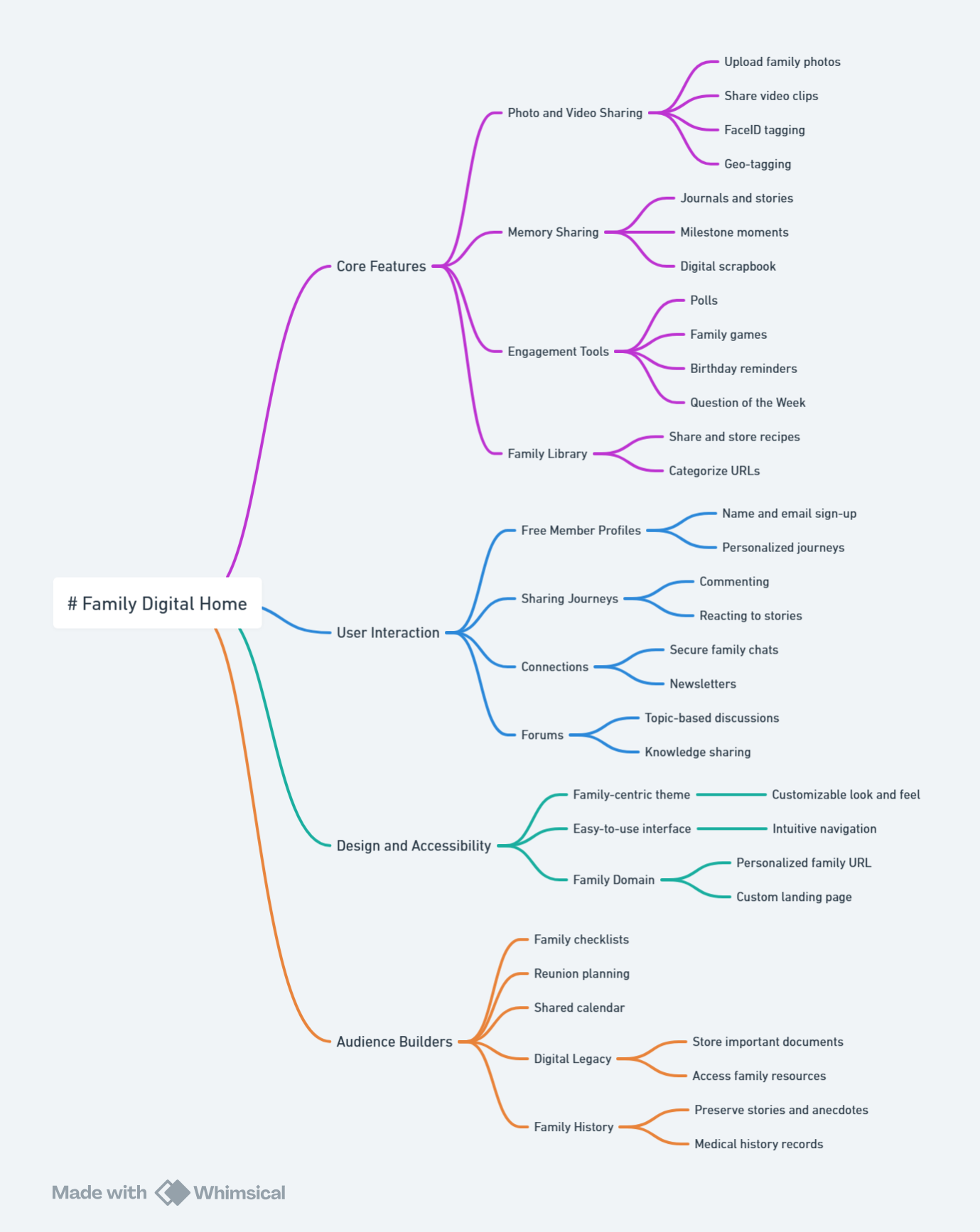
Familycrossings.com does a lot more than FamilyLobby ever did. It may take a few visits to get the family digging into your content, so we’ve included a couple of audience building tools like Question of the Week, Birthday Alerts and Cards, Family Polls and eBox.

Our core features include

What’s Included

Share family photos
Upload, View and Store your memories with ease
Our simple interface allows you to post and view your photos easily without special tools or software. Categories and meta tags allow you to quickly sort and search photos based on user, location, date and more.

Get Family News
Don’t miss the family’s coming and goings
Post family newsletters, stories, announcements and more. Now you can quickly and easily post and view all the family news that is fit to print!

Share recipes and remedies
Keep your favorite family dishes and cures here
Mom’s apple pie, Thanksgiving stuffing, nightmare cures; these are the things that make life’s events special. Now you can be sure you’ll always have them.

Family Calendar
Post birthdays, anniversaries, schedules and more
Soccer games, work, music lessons, class schedules; Family life is hectic. Make sure your family’s paths cross every chance they get with our easy to use, shared family calendar.

Wish Lists
Never buy the wrong gift again!
Is dad tired of getting ties every Father’s day? Did mom get dishes when she really wanted jewelry? Not anymore! Now each family member can post their wish list for every birthday and holiday to make shopping easy!

Store Family Addresses
Easily save and find phone numbers, email and home addresses
Does your rolodex look like a scrap book? Are family addresses scattered in multiple locations? With our simple system, the entire family can share one address book. Now you can email, make calls or mail letters with ease!

Hold Live Family Chats
Secure family style chats for the entire family
Have an old-fashioned gab session! Our chat system allows your entire family to talk to each other, at once, day or night without the fear of predators or scary phone bills.

Preserve Family History
Keep your family stories alive for generations to come
Keep your family’s stories, photos, news and more alive and safe for future generations. Offsite storage of back-ups means your family history is safe theft and natural disaster. Even your family secrets!

Crossings
Visualize your family data with maps, time lines and tag clouds

READY TO START? SIGNUP HERE


A FamilyLobby.com Alternative

It was recently discovered (July 5,2017) that Familylobby.com has decided to close its subscription service. While we spent some time looking at our competitors’ viability we did not expect them to enter End-of-Life stage.

Familycrossings.com has been in business for over 10 years and wants ALL families that use Familylobby to know that we will help you transition. Familycrossings.com new FTP function makes uploading the FamilyLobby photos fast and efficient since when the zip file is unpacked all the photos are rendered into new galleries. As an alternative to starting over creating a family member directory you can create a .csv of first name, last name, email address and send everyone in the family new invitations to Familycrossings. Using these two tools will save hours while you are creating your alternative to Familylobby.com.

We will not charge you to help you move the files to your new home. There is no waiting period we have everything ready today! We will not charge you for each family member and you upgrade your storage as you require.

You can signup right here to start sharing your family news, family photos, family stories, family videos, family contact information and much more.

If you need to contact us please email us or call us for information.

MyFamily Alternative Making Subscribers Smile

Familycrossings.com new FTP function makes uploading the MyFamily photos fast and efficient since when the zip file is unpacked all the MYFamily photos are rendered into new galleries. As an alternative to  starting over creating a family member directory you can create a .csv of first name, last name, email address and send everyone in the family new invitations to Familycrossings. Using these two tools will save hours while you are creating your alternative to MyFamily.com

MyFamily.com Final Answer from Ancestry.com

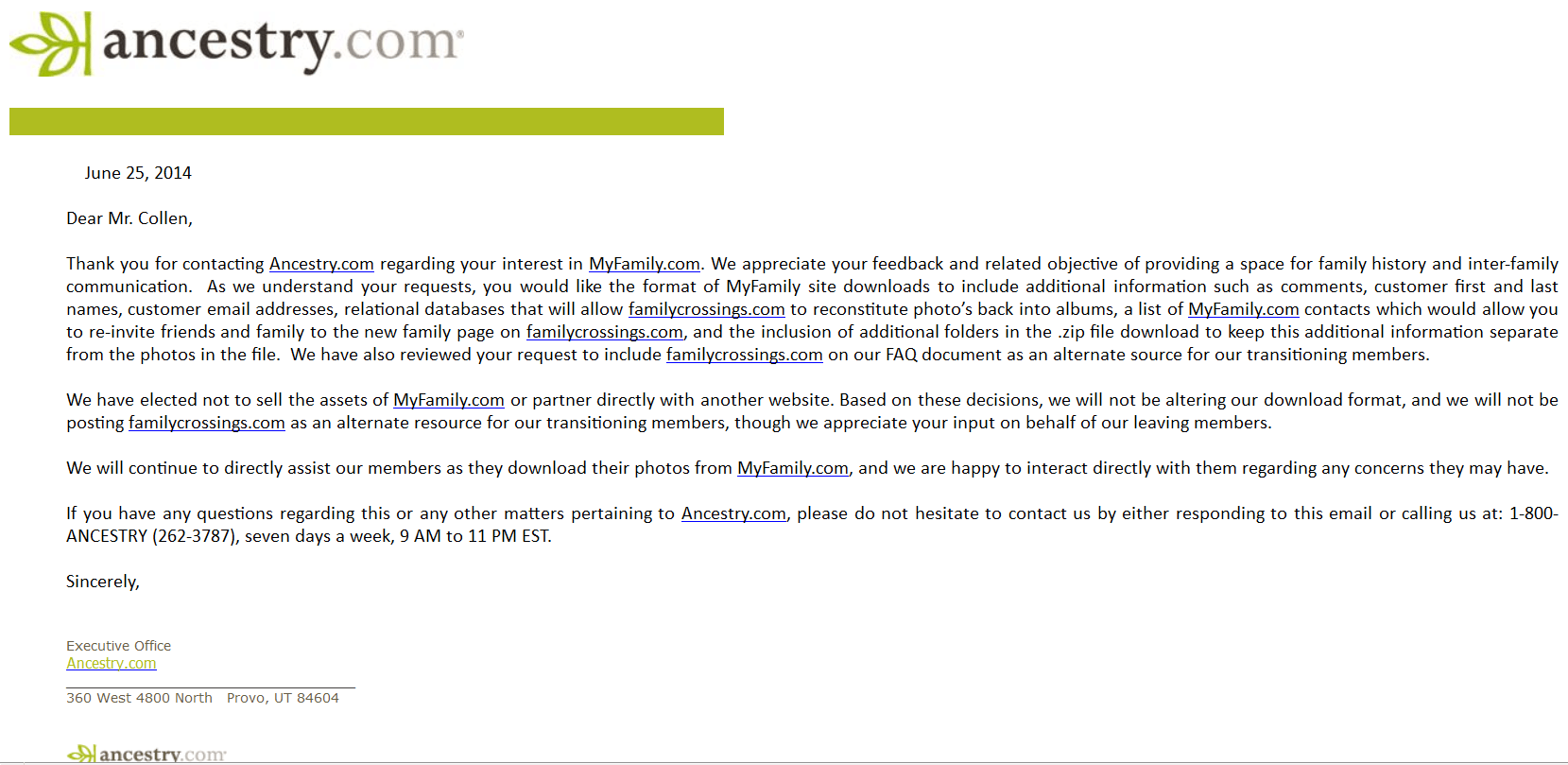
On June 25, 2014 Familycrossings received the email below from Ancestry.com regarding our requests that they step up and provide additional support for the subscribers of MyFamily. Our development team has worked quickly to provide you with a way of importing your members and adding your photos. Both tools work perfectly however we will not be able to provide any further tools to make for a better transition because of Ancestry.com’s response.

Click the image below to read the actual email.
Ancestry.com answer regarding Myfamily.com

Familycrossings.com will continue to assist Myfamily.com subscribers in transitioning to our family web site product.