
Familycrossings.com Update Almost Ready For Release

For 22 years Familycrossings has provided a safe, private web platform for families to create websites that let relatives share photos, videos, stories and calendar events.

The product is getting an update to the popular photo-sharing function. Called FaceID family members can click on faces in uploaded photographs, tag each face shown, and the site will also keep the information available to match up with other photos with faces using AI. All IDs are created in the browser with no information sent to third-party sites.

Familycrossings has included 2 games that use FaceID.

Who’s That? Matches faces to names with a scoreboard for competitive family activity.

faceid

The second game is named Face Memory Game and is based on the game Concentration. Family members can also keep score in this game.

Have some family fun with us. Sign up today!

🔒 Looking for a Private Alternative to Facebook?

Your family’s private moments shouldn’t be shared with advertisers or viewed by public strangers. Join thousands of families who share photos, coordinate calendars, and exchange news safely on FamilyCrossings.com.

  • 100% Secure & Ad-Free: Absolute privacy, zero data tracking, zero tracking pixels.
  • Better Group Tools: Structured galleries, shared calendars, custom recipes, and family address books.
  • Toll-Free Phone Support: Excellent, accessible phone support to help grandparents get online easily.


Start Your Private Family Site Free

💬 Frequently Asked Questions (FAQ)

Q: How does FamilyCrossings compare to social media for sharing private family website?

A: Unlike mainstream platforms, FamilyCrossings has zero public elements, zero tracking algorithms, and absolutely no advertisements. Only the immediate family members you specifically invite have access to your site.

Q: Is there a free trial to test these features with my family?

A: Yes! FamilyCrossings is free to try for 30 days. No credit card is required to sign up. Additionally, once a site is set up, all invited family members join and participate 100% free.

Q: Can older family members easily navigate the site?

A: We designed our website with seniors and grandparents in mind. The layout is simple, with large buttons and clean menus. We also offer toll-free customer support to assist family members at any step.
Keeping in touch with relatives can be tricky – until now

It’s true that keeping in touch with relatives can be challenging, especially if they live far away or have busy schedules. However, there are many tools and technologies that can make it easier to stay connected. One option is to use a family-centric website to share updates and stay in touch with each other. Social media platforms, like Facebook and Instagram, can also be useful for staying connected with relatives, as they make it easy to share photos and updates with a wide network of people. Additionally, communication tools like email, Skype, and FaceTime can be used to have more personal and interactive conversations with relatives, even if you’re not in the same place. By using these tools and technologies, it’s possible to maintain connections with relatives and stay up to date with what’s happening in each other’s lives, even if you’re not able to see each other in person very often.

Yes, keeping in touch with relatives can be tricky, but there are many ways to make it easier. One way is to use a family-centric website to share updates and stay connected with each other. This can be especially useful for families with members who live far apart, as it provides a convenient platform for sharing news and staying in touch. Additionally, social media and communication tools like email, Skype, and FaceTime can also make it easier to stay connected with relatives, even if you’re not in the same place. Regularly scheduling phone calls or video chats can also help to maintain connections with relatives and stay up to date with what’s happening in each other’s lives.

Wordle (clone) is now available for family play

WORDLE has taken America by storm and now your family can play it together.
Wordle is an online 5-letter word game. Each day a new word is released and players have six attempts to guess what the word of the day is. During the guesses, tiles will change color to help players get the word. A grey letter means it isn’t in today’s word, while a yellow letter signals it is in the word but in the wrong position. Then there’s the green letter which means it’s in the word and in the right place.
Players select letters of the alphabet on the virtual keyboard and enter them into the 5 blank tiles. When they’re happy with their 5-letter word guess, they press the submit button. This then checks the word and lets you know if your word or some of the letters are correct. If it’s completely right the full 5 letters turn green.
Familycrossings has modified the game to record a score (10 points for solving the game plus 1 point unused guess) and hold each member’s point total on a family scoreboard. There is only one word per day, all family members play the same word.

NOTE: Wordle can be found under PLAY navigation menu. If the word PLAY is not on your main menu have your site administrator go to Manage>Site Admin> Enable/Disable Features>Check PLAY, check WORDLE> click APPLY. The item will be added to the main menu.

Helping Your Family in Crisis Mode

A collaboration platform like Familycrossings can play a significant role in keeping your family safe in volatile times like epidemics, natural disasters. Bolstering family relationships with clear communication is essential to family dialogue and to fostering unity among your family members.

Familycrossings.com has many features that can be of immediate value to families that need to create order out of the confusion that has taken grip in our countries over Covid-19.

SCHEDULING
Calendar– for keeping family members informed about upcoming activities and use the RSVP function for status checks

INFORM
Checklist 1 – create a Disinfection List that each family member can complete when re-entering your home after being in a public space.
Checklist 2 – create an Action List for your family detailing what to do, where to go and who to call if a family member gets sick.
Checklist 3 – Create a Visitation follow-up list for an illness status update report.
Question of the Week – Family members can respond to a question you pose. For isolated family members knowing that others are also contributing answering may have an uplifting, unifying effect.
Family History– The Interview area has a section with 14 health-related questions that should be completed by all family members.

SHARE
Help Requests – maybe you need an item that another family member needs
Family Forum – Create a Discussion Board labeled Coronavirus and add topics to keep family members engaged.
Photo Sharing – Cheer family members up by posting your selfies while washing your hands, amusing photos from your exercise routine or what you made for dinner.

CONNECT
Address Book – Keep the family address book up to date with street addresses, email addresses, and birth dates.
Polls – Ask your family members to help in making decisions together.
Text Chat – If you have a family member in self-quarantine a cheerful group text chat can help relieve patient anxiety.
Group Email – Remember in the past when you were not included in the email invite for Sunday dinner or you only heard about because your cousin texted you. Familycrossings help ensures that you are not forgetting a family member in your communication by enable Share circles to manage email communication better.

Read more about Familycrossings.com here
Read about parent company Same-Page.com LLP here

The CDC website encourages families to plan and make decisions early that will protect you and your family during an outbreak or other disaster. Creating a household plan can help protect your health and the health of those you care about in the event of an outbreak in your community.

CDC LINKS FOR FAMILIES

https://www.cdc.gov/coronavirus/2019-ncov/prepare/get-your-household-ready-for-COVID-19.html

https://www.cdc.gov/coronavirus/2019-ncov/prepare/disinfecting-your-home.html

https://www.cdc.gov/coronavirus/2019-ncov/prepare/faq.html

FAMILY PRIVACY

Familycrossings.com is a private social platform designed for families. We share none of your content with anybody else and we have no third-party applications mining your data. You can sign up for a subscription for as little as $10 per year. The name of our parent company SAME-PAGE.com LLP will appear on your credit card statement.

PROTECTING YOUR FAMILY TAKES A LITTLE EFFORT

Familycrossings provides FREE setup help. Please visit our CONTACT PAGE to request support and include your phone number and time zone. We will send you a confirmation email.

A New User Interface Update

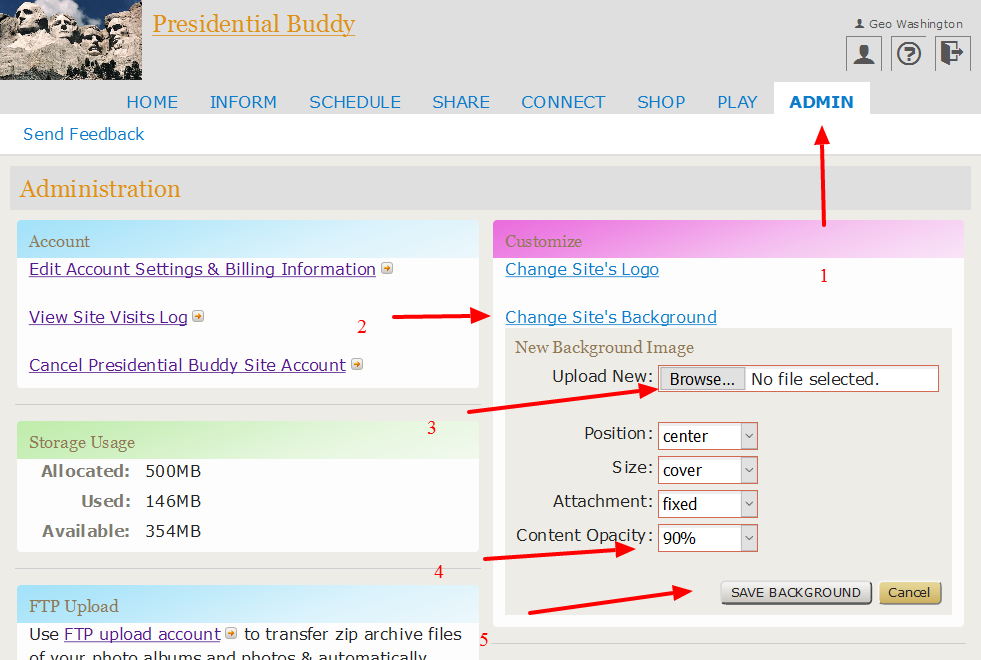
An often requested user interface improvement for Familycrossings.com has just been added. The feature allows administrators to select a photo to use as a background behind family content. Additionally the feature allows you to control the transparency of the foreground.


Start by clicking ADMIN

Complete this administration area to customize your family website portal
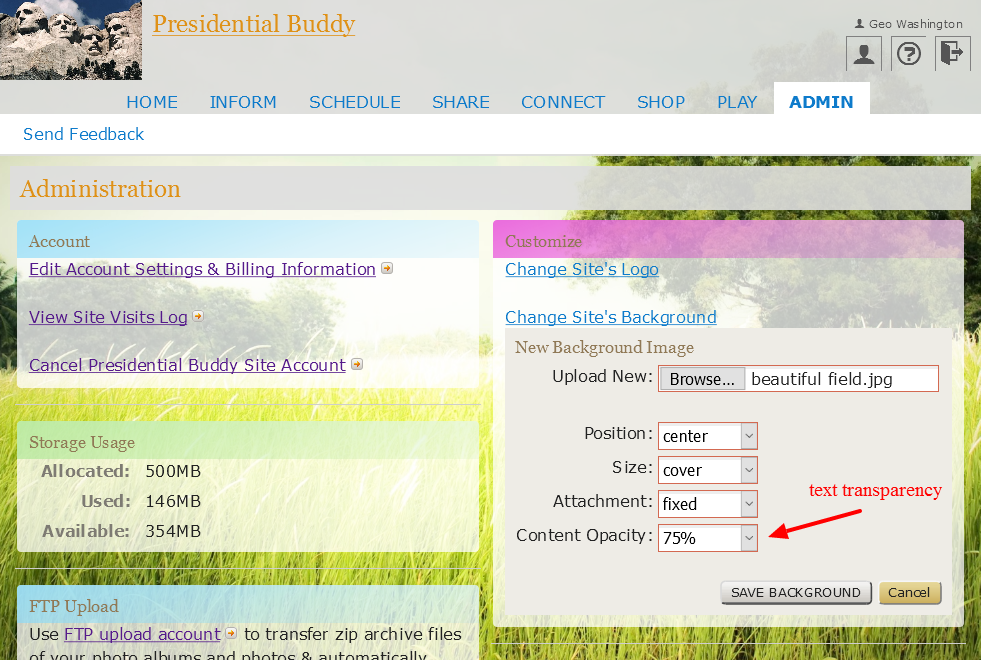
Complete this administration area to customize your family website portal. Select “content opacity to let the background show through under the content.

Select your content transparency

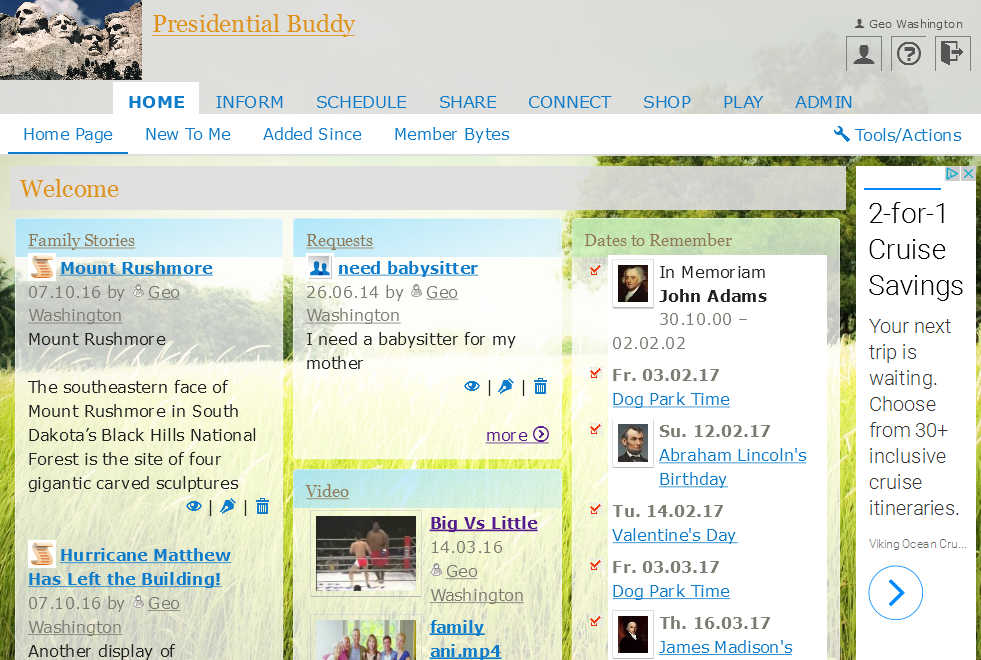
An example of what your family site can look at with a background image.

The background can be any jpg, png file. Here is the image we used.

You can use this image for your background.

Enjoy the update.


Its a New Look for Family Crossings

It started in June of 2016 on a Sunday afternoon. Our lead web developer sat down with Bruce Collen to flesh out the redesign for our Family website product. The MyFamily.com customers had shown us where we could improve the product now we needed to focus our energies. So we re-read all of your feedback email, watched your actions during training session, & reviewed the survey results from our various customer polls. If you are a member of a Familycrossings.com site we hope you will enjoy the new responsive interface. It will work well on any computer or mobile device. You won’t need an app just login.

So here is what you get:

1) A new, cleaner interface. We have removed the left navigation system completely. You can now use our simpler top tab and sub navigation to move through the different site sections. In a tab the Active section is now underlined to better show the active feature. On the right hand side of the navigation you will find Tools/Actions- click this to add, change or delete content from a section.
2) Image of Day (IoD) is now a vote based process. Every photo has a vote function located to the right of the image. Click it to register your vote. The home page Image of Day will immediately change. If another image is voted up by more people than the existing image the new image will replace the other image immediately. All Image of the Day photos will be available in the IoD Photo Album.
3) More Storage – Standard now includes 500 MB of storage. Premium now includes 1 GB of storage. If you order extra storage you will now get twice as much for the same price ie get 2 GB for the price of 1 OR 4 additional GB for the price of 2 GB
4) Save as you write function has been added to Stories and Database
5) Parenting Center section has been changed to Requests
6) Photo Galleries section has been changed to Photos / Album thumbnails enlarged
7) Family Database has been changed to Library
8) Personal Profile section has been moved to upper right
9) Larger text in Help area
10) Feedback- Has been moved to the Admin area and can only be used by Administrators
11) Removed “Family Site” text from the label of site

12)Added the ability to use an image as a background with set transparency

13) Increased Address Privacy- It is now possible to hide your personal information by clicking on your Profile, click on My Addresses, scroll down to Privacy Options, click the button for Selected Members and then choose ONLY the family members who SHOULD see your address and email account information.
14) Shopping- This section is revamped with brand new stores offering uniques products and special savings. Want to save $10 on groceries every week? Check out our Coupons area.
15) History Medical section added 10 questions

So what are you waiting for? Go login here and start adding new items to share with your family.


Family Crossings Update

For the hundreds of MyFamily clients who converted to Familycrossings.com your wait is over. We listened to your feedback and have delivered a new Family friendlyfeature.

Located in the “What’s New” area the link named “New to Me” will bring you every photo, every story, every comment that you have not clicked on. The site will start by bringing you the last 30 days of content and then will start removing from this page the items you clicked. There is a “dismiss” function if you wish to delete from “New to Me” all the content by area or by each item.

An update to our navigation will be coming soon.

Question of the Week – New Feature

We have recently uploaded a new feature called “Question of the Week”. The feature is designed to encourage more interaction between your family members. It is a semi-automated processes that will allow you to either select from standard questions (like how was your Fourth of July) or create your own and then pre-schedule the questions to be deliverable by email to your family members.

Each family member can click the link and respond with a suitable answer. The next step is to publish the answers to your family site. The whole process takes only a few minutes to get a year’s worth of questions into the Familycrossings system.

Enjoy!!!

Member Bytes

This morning we uploaded a new feature to Familycrosings.com called Member Bytes. It is an alternative to the Home Page and What’s New.

Member Bytes shows ALL the content and comments added by each Family Member and can be sorted by “Most Recent”, “Member’s Name”, or “Content Score”. Content score references the amount of content and comments that each Family Member has added.

Check it out the next time you log in.

Transfer Photos From MyFamily Via FTP is Now Available

MyFamily.com members who already have zip archives containing photos can begin uploading them via FTP. The process will be at least 6 times faster than http based uploads. We have also made it easier rotate and add titles, descriptions and tags to your family photos as you review each new gallery.

Save time and read the instructions before you start. Check this space for webinar times for the Week June 23 to June 29, 2014.

BTW As of 6/22/2014 the status of MyFamily.com is not available. (Day 5). We will let you know by tweet @familycrossings and this blog when we have more info about MyFamily.com.

🔒 Looking for a Private Alternative to Facebook?

Your family’s private moments shouldn’t be shared with advertisers or viewed by public strangers. Join thousands of families who share photos, coordinate calendars, and exchange news safely on FamilyCrossings.com.

  • 100% Secure & Ad-Free: Absolute privacy, zero data tracking, zero tracking pixels.
  • Better Group Tools: Structured galleries, shared calendars, custom recipes, and family address books.
  • Toll-Free Phone Support: Excellent, accessible phone support to help grandparents get online easily.


Start Your Private Family Site Free

💬 Frequently Asked Questions (FAQ)

Q: How does FamilyCrossings compare to social media for sharing private family website?

A: Unlike mainstream platforms, FamilyCrossings has zero public elements, zero tracking algorithms, and absolutely no advertisements. Only the immediate family members you specifically invite have access to your site.

Q: Is there a free trial to test these features with my family?

A: Yes! FamilyCrossings is free to try for 30 days. No credit card is required to sign up. Additionally, once a site is set up, all invited family members join and participate 100% free.

Q: Can older family members easily navigate the site?

A: We designed our website with seniors and grandparents in mind. The layout is simple, with large buttons and clean menus. We also offer toll-free customer support to assist family members at any step.